Choosing a Watch for Video Calls: Check Your Own Camera View
About 4 min read
For a video-call outfit, choose a watch for your own use first, then check whether it is visible in your ordinary camera framing. A close-up store photograph does not show how that item will look in a small meeting window. Keep the appearance check separate from wrist fit, desk comfort and any question about how the supplied watch operates.
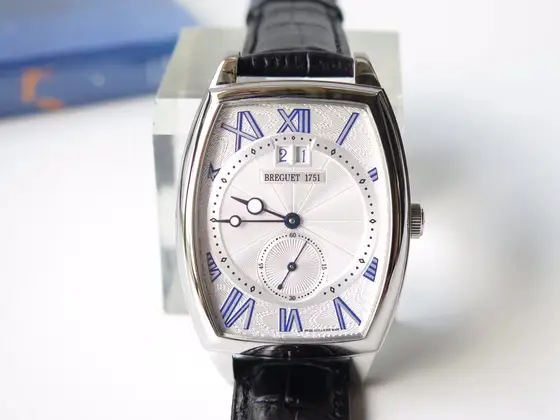
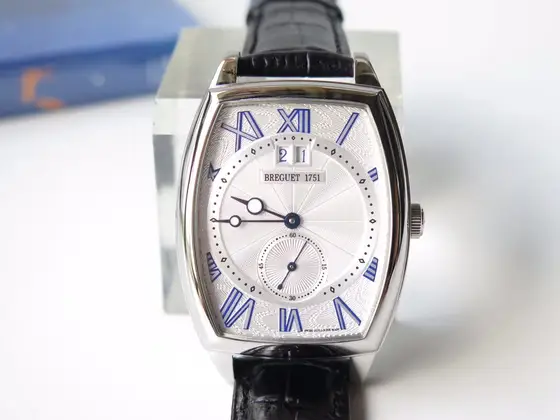
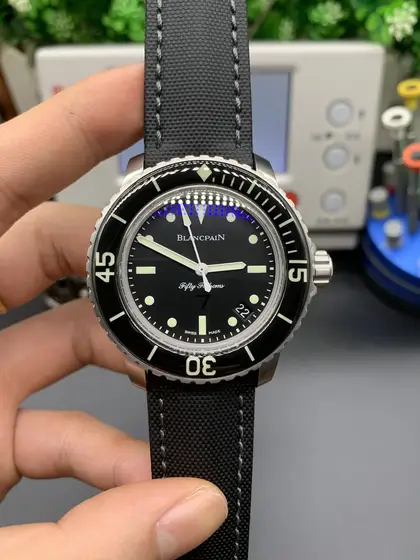
The two references here are BREGUET inventory 03739 and BLANCPAIN inventory 03055, photographed Tavorin replica listings. They are not genuine or original-manufacturer-authorised watches. These unchanged store images illustrate different visible outlines; neither item has been tested in a video meeting for this guide.
Start with the camera position you actually use
Open a private camera preview using your usual seating, lighting and sleeve. You do not need to record or send a meeting. If you already wear a watch, notice whether the wrist is usually in frame, briefly appears when you move, or stays below the camera. There is no need to change a comfortable working position merely to display an accessory.
Look at the whole preview before enlarging a wrist detail. Decide whether you prefer a noticeable outline or an unobtrusive addition to your clothes. This is a styling preference, not a test of the photographed replicas or a reason to present one as an original-brand watch.
Compare the outline before the smallest markings
Inventory 03739 shows a pale face inside a curved, elongated border, blue-looking Roman numerals, a small lower display and a dark textured strap. The outline and the light-versus-dark contrast are useful features to compare with an outfit. The small display and printed words do not establish a movement, calendar function or case material.
Inventory 03055 instead shows a dark round face, pale hands and markers, a dark outer ring with large numerals and a dark strap. This is a different arrangement of light details against dark areas, rather than the broad pale face of 03739. The outer-ring markings are appearance evidence only, not a water-resistance test.
Keep screen appearance and buying evidence separate
- Use a normal-sized camera preview for the outfit decision, not only a magnified still.
- Notice reflections or a sleeve that obscures a watch you already own; do not treat that observation as a result for an unseen item.
- Compare the exact listing photographs separately at their available resolution.
- Ask for the offered item’s dimensions and fastening details before making a physical-fit decision.
If a seller supplies a follow-up image or demonstration, keep the inventory number and product URL with it. A watch shown clearly in one camera view does not prove that its smallest markings will be equally visible in your own setup. It also does not establish that you can read the time comfortably while wearing it.
Should I buy the larger-looking watch for a call?
Not on these photographs alone. The images do not share a verified physical scale, and this guide has not measured either watch. Compare appearance as a preference, then request measurements rather than treating the displayed image size as the actual case size.
Does looking suitable on camera settle desk comfort?
No. Use the separate desk-work watch fit checklist for questions about typing, writing and fastening contact. For the basic lighting comparison, read how everyday light affects a watch photograph. This article focuses on camera framing, not a claim that either replica is comfortable or performs in a particular way.
Questions about these watches?
Ask us on WhatsApp for current photos, sizing and delivery details. Include the watch you are interested in so we can help.
WhatsApp: +63 965 401 5278